iWorld
Here’s how you can control who replies to your Tweets with Twitter’s new conversation settings

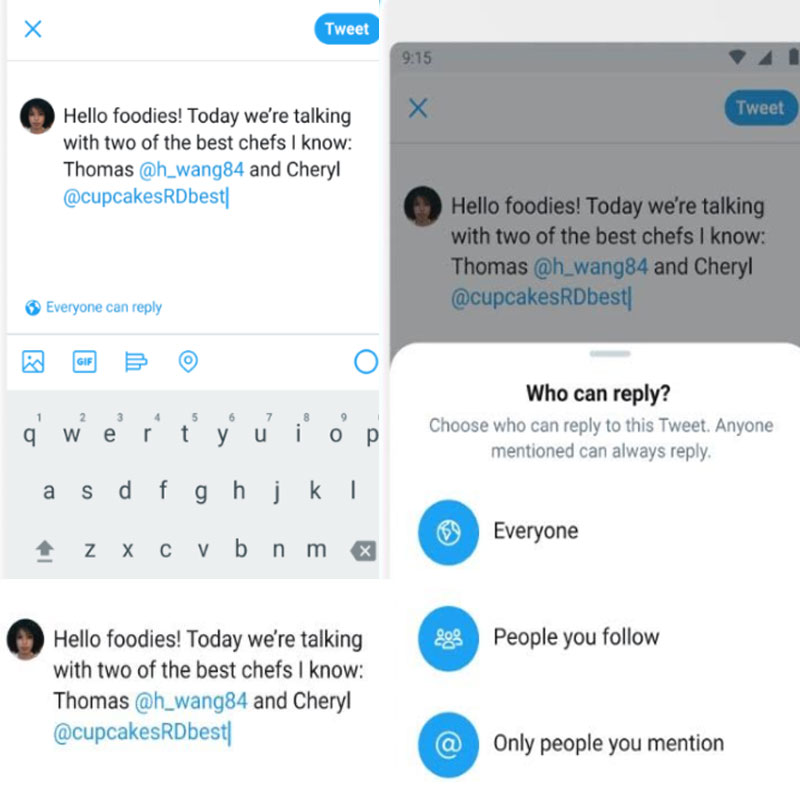
NEW DELHI: Twitter is where people go to see and talk about what’s happening. But sometimes, unwanted replies make it hard to have meaningful conversations. The service has been working to give people more control over their conversations. To this end, Twitter has globally rolled out a new update that gives people the ability to choose who can reply to their Tweets and join in their conversation.
These new conversation settings are available to everyone using Twitter, across iOS, Android and twitter.com. Here are some simple tips on how you can make the most of these new controls from Twitter
How to choose: who can reply to your Tweet
From twitter.com or the Twitter for iOS or Android app, tap on the compose Tweet button
Click or tap the globe icon, to choose who can reply to your Tweet from the following options:
Everyone
People you follow
Only people you mention
Once you finalise your settings, compose your Tweet and click or tap Tweet to post
Important to note: People who can’t reply will still be able to view, Retweet, Retweet with Comment, like and share your Tweets. Also, once you’ve published a Tweet, you cannot change the reply settings of that particular Tweet.
How to choose: who you can reply to
From the compose screen, you can see the people in the conversation you will reply to. Click or tap Replying to… to bring up an editing screen with a list of everyone who is a part of the conversation. Up to 50 people who are in the conversation will be displayed.
Adding people to a conversation: Swipe down to close the editing screen, and then simply type their username into your Tweet.
Removing people from a conversation: To remove people from the conversation in the editing screen, simply click or tap on the checkmark icon to deselect participants. Once someone is unselected, the checkmark icon will be unchecked.
Blocked accounts: Accounts you have blocked will be visible to you in the recipient list, and will indicate that you have blocked them. From the editing screen, you can choose to remove the blocked account from the conversation by clicking or tapping on the checkmark icon.
How to view participants of a conversation
You can also view participants of a conversation from Tweets you see in your Home timeline, profile page, notifications, or from a Tweet detail. To view participants’ names, bio, and @usernames:
Click or tap Replying to…
From here you can see everyone who is included in this reply. You can also follow or unfollow people in this list.
Just like you can see the total number of likes and retweets for any tweet, you can also see how many people are participating in the conversation by the reply count. You’ll see a number next to the reply icon indicating how many direct replies the original Tweet has received.