iWorld
Google Messages adds custom themes for individual RCS chats
Android users can now change chat colours and wallpapers without affecting recipients


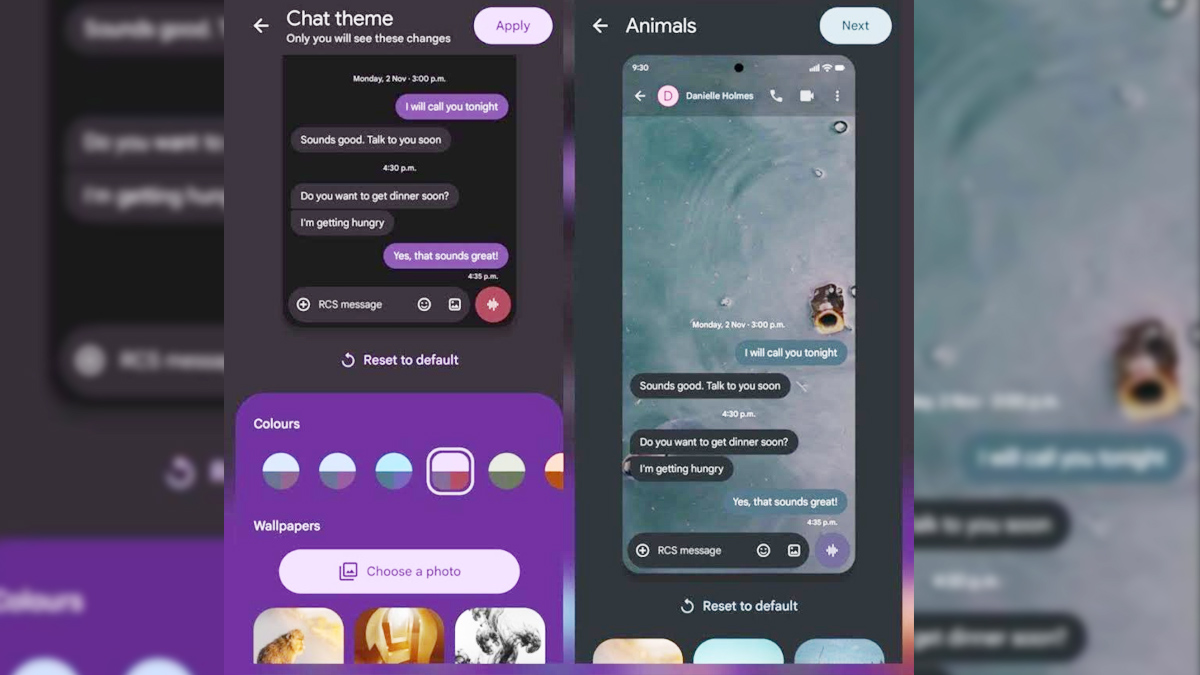
MUMBAI: Your chats are getting a little more colourful, one conversation at a time. Google Messages is rolling out custom chat themes for Android, allowing users to personalise individual RCS conversations with different message bubble colours and wallpapers.
The feature lets users choose from colour presets, browse Google’s wallpaper collection or pick an image from their own gallery. The catch? The makeover is strictly local — the theme appears only on the user’s device and does not change how the conversation looks to the recipient, including in group chats.
The customisation requires RCS messaging and the latest version of Google Messages. Users can check for updates through the Google Play Store by tapping their profile icon, selecting Manage apps & device and checking for available updates.
To switch on RCS, users can open Google Messages, tap the profile icon, select Messages settings, go to RCS chats and make sure Turn on RCS chats is enabled.
Once RCS is active and the app is updated, users can open the conversation they want to customise and tap the recipient or group name at the top. Alternatively, they can use the three-dot menu in the upper-right corner and select Chat theme.
From there, users can choose a colour preset and add a wallpaper. Google offers wallpaper categories including Animals, Landscapes and Space, while the Choose a photo option allows users to pull an image directly from their gallery.
The message bubbles automatically adjust to complement the selected wallpaper, although users can manually change the colour palette if the default combination does not quite hit the mark.
Not feeling the new look? A Reset to default option restores the standard chat appearance.
The feature had been tested in beta in recent weeks and has now been officially announced for Android. Availability may vary as Google continues rolling out the functionality to users.